F5 and Hashicorp Basics > F5 Automation With Terraform > Lab 1 - Basic BIG-IP Administration with Terraform Source |
BIG-IP Onboarding wtih DO (Declarative Onbarding)
In this section you will configure basic network configurations like NTP, DNS, and interface IP addresses.
Create bigip1.do.json json declaration
touch bigip1.do.json- use vscode to add the following code to bigip1.do.json
{
 "$schema": "https://raw.githubusercontent.com/F5Networks/f5-declarative-onboarding/master/src/schema/latest/base.schema.json",
 "schemaVersion": "1.12.0",
 "class": "Device",
 "async": true,
 "label": "LTM declaration for declarative onboarding",
 "Common": {
     "class": "Tenant",
     "mySystem": {
         "class": "System",
         "hostname": "bigip1.f5demos.com",
         "cliInactivityTimeout": 1200,
         "consoleInactivityTimeout": 1200,
         "autoPhonehome": false
     },
     "myDns": {
         "class": "DNS",
         "nameServers": [
             "8.8.8.8",
             "8.8.4.4"
         ],
         "search": [
             "f5demos.com"
         ]
     },
     "myNtp": {
         "class": "NTP",
         "servers": [
            "0.pool.ntp.org",
             "1.pool.ntp.org",
             "2.pool.ntp.org"
         ],
         "timezone": "UTC"
     },
     "admin": {
         "class": "User",
         "userType": "regular",
         "password": "F5d3vops$",
         "shell": "bash"
     },
     "myProvisioning": {
         "class": "Provision",
         "ltm": "nominal",
         "asm": "nominal"
     },
     "internal": {
         "class": "VLAN",
         "tag": 4091,
         "interfaces": [{
             "name": "1.1",
             "tagged": false
         }]
     },
     "internal-self": {
         "class": "SelfIp",
         "address": "10.1.10.6/24",
         "vlan": "internal",
         "allowService": "default",
        "trafficGroup": "traffic-group-local-only"
     },
     "external": {
         "class": "VLAN",
         "tag": 4092,
         "interfaces": [{
             "name": "1.2",
             "tagged": false
         }]
     },
     "external-self": {
         "class": "SelfIp",
         "address": "10.1.20.6/24",
         "vlan": "external",
         "allowService": "none",
         "trafficGroup": "traffic-group-local-only"
     },
     "default": {
         "class": "Route",
         "gw": "10.1.20.1",
         "network": "default",
         "mtu": 1500
     },
     "dbvars": {
         "class": "DbVariables",
         "ui.advisory.enabled": true,
         "ui.advisory.color": "green",
         "ui.advisory.text": "BIG-IP1"
     }
 }
}
Modify files to only deploy basic network configurations (NTP, DNS, VLANS and SELFIPs)
mv f5base.tf f5base.tfbkupmv app1.tf app1.tfbkup- use vscode to modify main.tf with the following code to use bigip_do
terraform {
required_providers {
  bigip = {
    source = "F5Networks/bigip"
    version = "1.3.1"
  }
}
}

provider "bigip" {
  address = "10.1.1.6"
  username = "admin"
  password = "F5d3vops$"
}

resource "bigip_do"  "bigip1" {
   do_json = "${file("bigip1.do.json")}"
   timeout = 15
}
terraform planterraform apply -auto-approve
Note
The apply will most likely result with and error due to resource dependencies. If so, you may simply run terraform apply again. However I recommend you resolve the dependencies as hinted in the previous step to ensure consistency.
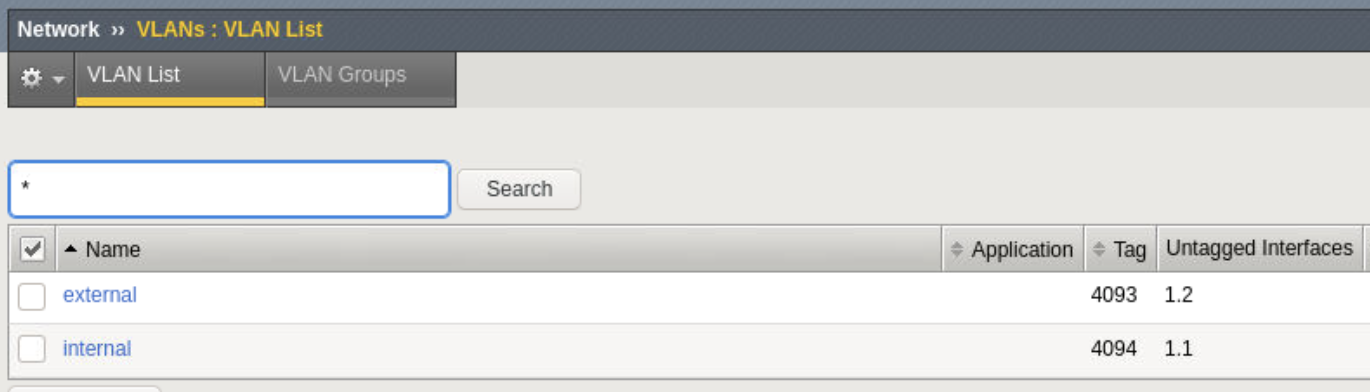
Confirm BIG-IP is now configured
- Explore BIG-IP GUI Network -> SelfIP and Vlan settings are now configured

Note
Bonus lab - Create json declaration for bigip2 (10.1.1.7) given external 10.1.20.7 and internal 10.1.10.7 and apply plan.