F5 and Hashicorp Basics > F5 Automation With Terraform > Lab 1 - Basic BIG-IP Administration with Terraform Source |
BIG-IP App Services Configuration
In this section you will configure basic application delivery services such as nodes, pools, pool members and virtual servers.
Create app1.tf
touch app1.tf- use vscode to add the following code to app1.tf
resource "bigip_ltm_monitor" "monitor" {
  name     = "/Common/app1_monitor"
  parent   = "/Common/http"
  send     = "GET /\r\n"
  timeout  = "300"
  interval = "3"
}

resource "bigip_ltm_node" "node" {
  name    = "/Common/10.1.10.5"
  address = "10.1.10.5"
}

resource "bigip_ltm_pool" "pool" {
  name                = "/Common/app1_pool"
  load_balancing_mode = "round-robin"
  monitors            = ["/Common/app1_monitor"]
  allow_snat          = "yes"
  allow_nat           = "yes"
  depends_on = [bigip_ltm_monitor.monitor]
}

resource "bigip_ltm_pool_attachment" "attach_node" {
  pool = "/Common/app1_pool"
  node = "/Common/10.1.10.5:80"
  depends_on = [bigip_ltm_pool.pool, bigip_ltm_node.node]
}

resource "bigip_ltm_virtual_server" "http" {
  pool = "/Common/app1_pool"
  name = "/Common/app1_vs"
  destination = "10.1.20.20"
  port = 80
  source_address_translation = "automap"
  depends_on = [bigip_ltm_pool.pool]
}
Deploy App1 services
terraform planterraform apply -auto-approve

Confirm BIG-IP is now configured
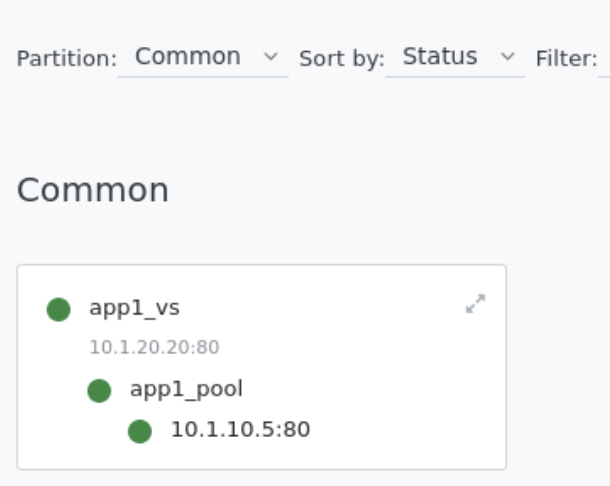
- Explore BIG-IP GUI Local Traffic -> Network Map to view app1 services