F5 and Hashicorp Basics > F5 Automation With Terraform > Lab 2 - Declarative BIG-IP Administration with AS3 Source |
Deploy App Services via AS3
In this section you will create a json declaration to deploy app services using AS3.
Confirm BIG-IP is not configured
- Explore BIG-IP GUI Local Traffic -> Network Map to validate no app services
Create main.tf to use terraform bigip provider
- Open client server vscode termninal
mkdir ~/projects/lab2cd ~/projects/lab2touch main.tf- use vscode to add the following code to main.tf
terraform {
  required_providers {
    bigip = {
      source = "F5Networks/bigip"
    }
  }
}

provider "bigip" {
    address = var.address
    username = var.username
    password = var.password
}

resource "bigip_as3" "tenant01_app1" {
   as3_json = "${file("app1.json")}"
}
Create variables.tf
touch variables.tf- use vscode to add the following code to variables.tf
variable "address" {}
variable "username" {}
variable "password" {}
Create terraform.tfvars
touch terraform.tfvars- use vscode to add the following code to terraform.tfvars
address = "10.1.1.6"
username = "admin"
password = "F5d3vops$"
Create app1.json
touch app1.json- use vscode to add the following code to app1.json
{
    "class": "AS3",
    "action": "deploy",
    "persist": true,
    "declaration": {
        "class": "ADC",
        "schemaVersion": "3.0.0",
        "id": "example-01",
        "label": "Tenant 1",
        "remark": "Simple HTTP application with round robin pool",
        "Common": {
            "class": "Tenant",
            "Shared": {
                "class": "Application",
                "template": "shared",
                "virt_addr_10_1_20_20": {
                    "class": "Service_Address",
                    "virtualAddress": "10.1.20.20"
                }
            }
        },
        "tenant_01": {
            "class": "Tenant",
            "App_1": {
                "class": "Application",
                "template": "generic",
            "app1_vs": {
                "class": "Service_Generic",
                "virtualAddresses": [
                    {"use": "/Common/Shared/virt_addr_10_1_20_20"}
                ],
                "virtualPort": 3000,
                "pool": "web3000_pool",
                "profileHTTP": {"use": "http"}
                },
                "web3000_pool": {
                    "class": "Pool",
                    "monitors": [
                        "http"
                    ],
                    "members": [
                        {
                            "shareNodes": true,
                            "servicePort": 3000,
                            "serverAddresses": [
                                "10.1.10.5",
                                "10.1.10.10"
                            ]
                        }
                    ]
                }
            }
        }
    }
}
Deploy App1 services
terraform initterraform planterraform apply -auto-approve
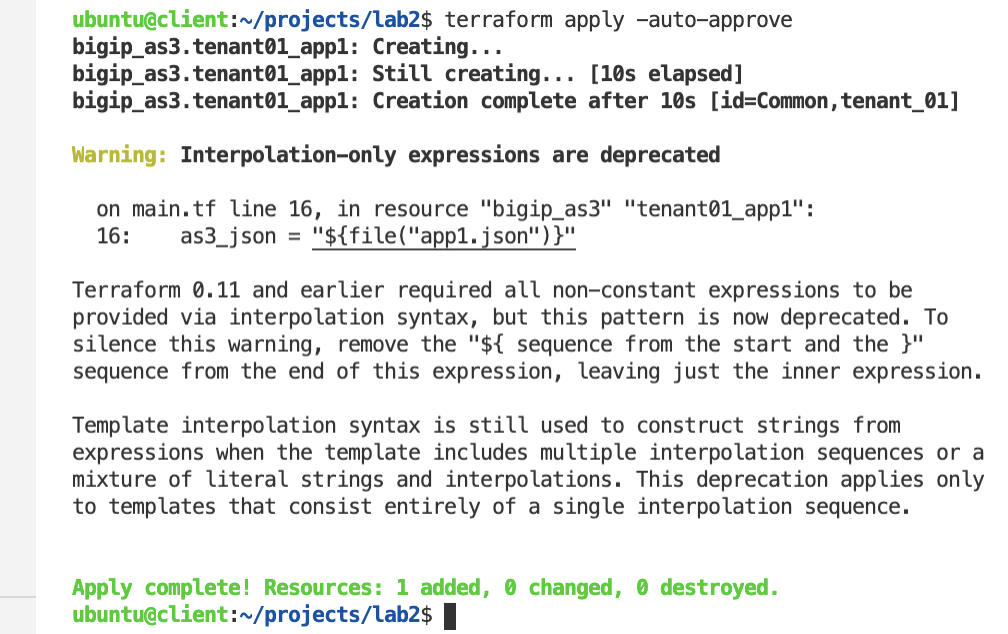
Confirm BIG-IP is now configured
- Explore BIG-IP GUI Local Traffic -> Network Map to view app1 services
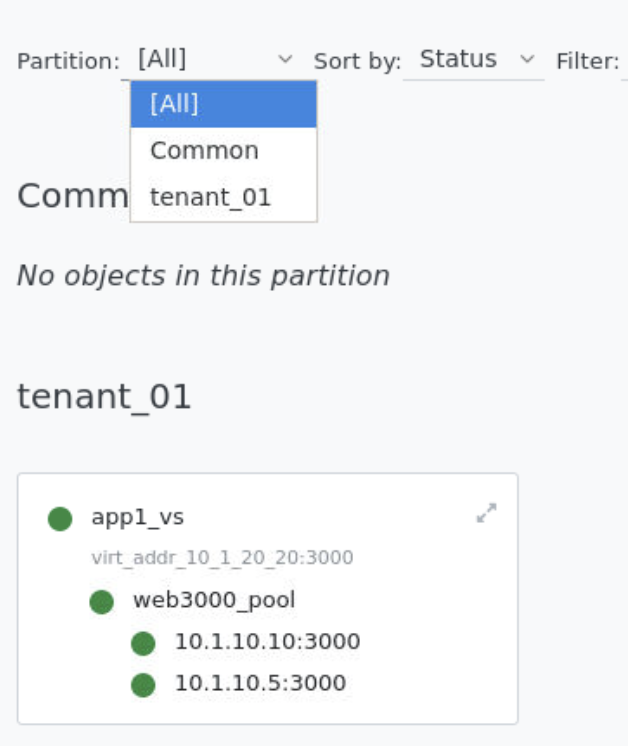
Create app1a.json
touch app1a.json- use vscode to add the following code to app1a.json
{
    "class": "AS3",
    "action": "deploy",
    "persist": true,
    "declaration": {
        "class": "ADC",
        "schemaVersion": "3.0.0",
        "id": "example-01",
        "label": "Tenant 1",
        "remark": "Simple HTTP application with round robin pool",
        "Common": {
            "class": "Tenant",
            "Shared": {
                "class": "Application",
                "template": "shared",
                "virt_addr_10_1_20_20": {
                    "class": "Service_Address",
                    "virtualAddress": "10.1.20.20"
                }
            }
        },
        "tenant_01": {
            "class": "Tenant",
            "App_1": {
                "class": "Application",
                "template": "generic",
            "app1_vs": {
                "class": "Service_Generic",
                "virtualAddresses": [
                    {"use": "/Common/Shared/virt_addr_10_1_20_20"}
                ],
                "virtualPort": 3000,
                "pool": "web3000_pool",
                "profileHTTP": {"use": "http"}
                },
                "web3000_pool": {
                    "class": "Pool",
                    "monitors": [
                        "http"
                    ],
                    "members": [
                        {
                            "shareNodes": true,
                            "servicePort": 3000,
                            "serverAddresses": [
                                "10.1.10.5",
                                "10.1.10.10"
                            ]
                        }
                    ]
                }
            },
  "App_2": {
    "class": "Application",
    "template": "http",
    "serviceMain": {
    "class": "Service_HTTP",
          "virtualAddresses": [
              {"use": "/Common/Shared/virt_addr_10_1_20_20"}
          ],
          "virtualPort": 8080,
          "pool": "web8080_pool",
          "persistenceMethods": []
    },
    "web8080_pool": {
    "class": "Pool",
    "monitors": [
      "http"
    ],
    "members": [{
            "shareNodes":true,
      "servicePort": 8080,
      "serverAddresses": [
      "10.1.10.5",
      "10.1.10.10"
      ]
    }]
    }
  }
}
}
}
Modify main.tf to use app1a.json
- use vscode to replace app1.json with app1a.json
resource "bigip_as3"  "tenant01_app1" {
   as3_json = "${file("app1a.json")}"
}
Redeploy App1 services with 2nd app
terraform planterraform apply -auto-approve
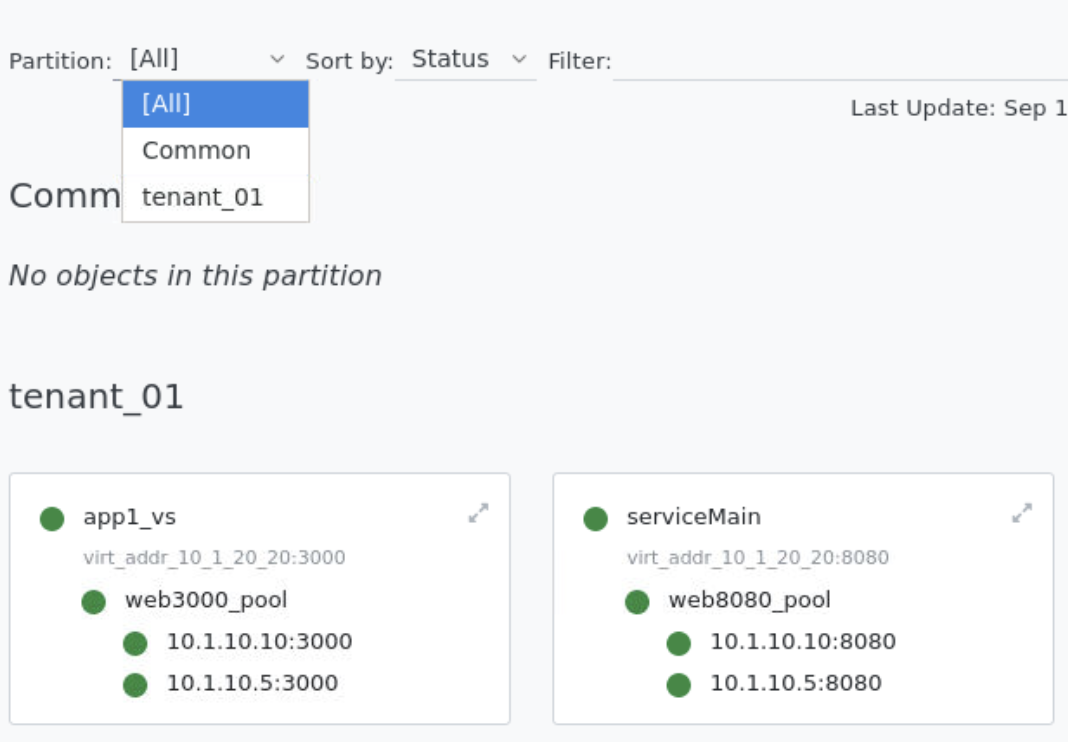
Confirm BIG-IP is now configured with multiple apps
- Explore BIG-IP GUI Local Traffic -> Network Map to view app1 and app2 services
Tip
Creating multiple versions of your as3 json files allows for quick rollback to previous version if issues occur.